Tech explained
Passkeys vs Passwords Explained: Which Is Safer and When to Use Each
Updated Nov 27, 2026 · 3 min read
A passkey is safer than a password. It stays on your phone or laptop, unlocks with your face, fingerprint or PIN, and only answers the real website, so a fake login page gets nothing and a hacked site only holds a public key that can't sign anyone in. Passwords still work everywhere, so use a passkey wherever a site offers one and a password manager with two-step verification for the rest.
Key points
- ●A password is a secret you type; a passkey is a key pair whose private half never leaves your device.
- ●Passkeys are tied to the real site's address, so phishing pages get nothing.
- ●A breached site leaks passwords, but only useless public keys for passkeys.
- ●Microsoft reports 98% of passkey sign-ins succeed, against 32% for passwords.
- ●Passwords still win on reach: passkeys were 28% of Dashlane users' Google logins.
The short answer
Microsoft wants you to stop typing passwords, and the numbers back it up. Microsoft reports that 98% of passkey sign-ins succeed, against 32% for passwords. Passkeys win on safety and speed. Passwords still win on one thing: they work on every site.
What each one is
A password is a secret you type, like Fluffy2019. The website stores a hashed copy of it. Anyone who has the secret can sign in as you.
A passkey is a key pair made by your phone or laptop. The private key never leaves your device. The website only stores the public key. You unlock the private key with your face, your fingerprint or your device PIN, and the device proves to the site that it's you. Nothing secret is typed or sent.
That difference is the whole story. A password is something you know, so anyone you tell it to, on purpose or by accident, knows it too. A passkey is something your device holds and never shares. You can't type it into the wrong page, because you never type it at all.
Round by round
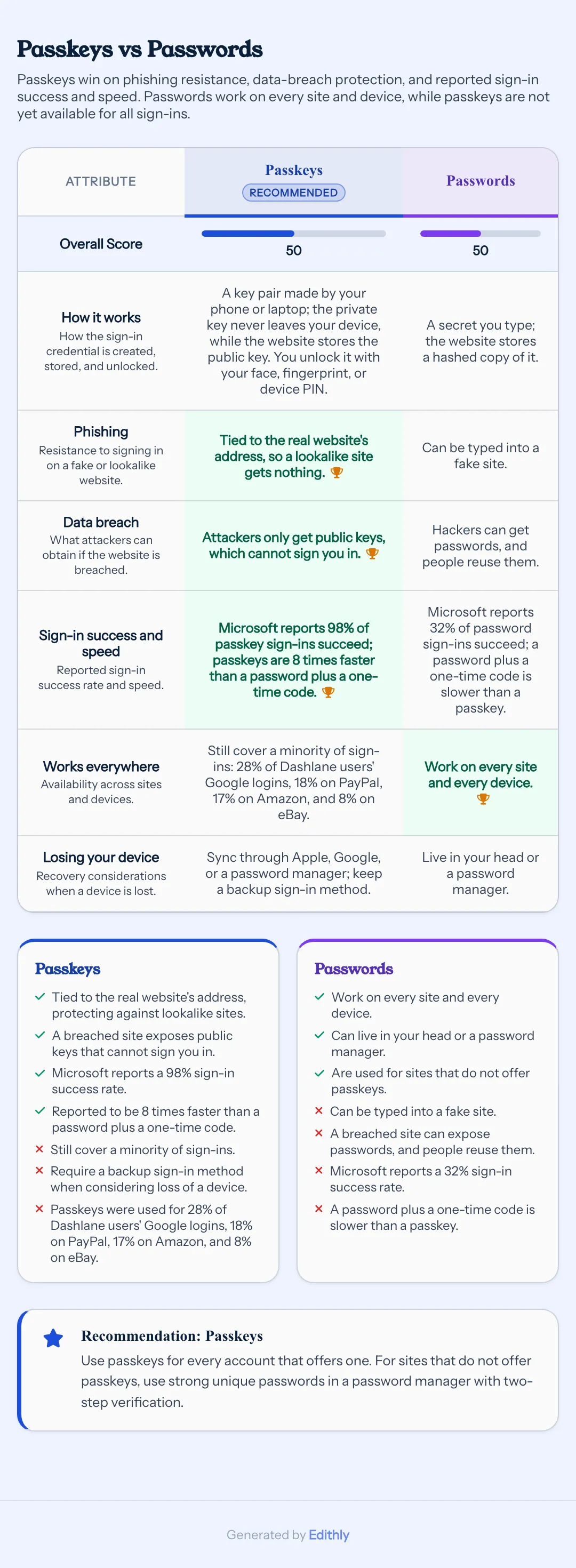
The visual sheet above scores the two side by side. Here's the same comparison:
| Round | Passkeys | Passwords |
|---|---|---|
| Phishing | Tied to the real site's address, so a lookalike site gets nothing | Can be typed into a fake site |
| Data breach | Attackers only get public keys, which can't sign you in | Hackers get passwords, and people reuse them |
| Sign-in success | Microsoft reports 98%, and 8 times faster than a password plus a one-time code | Microsoft reports 32% |
| Works everywhere | Still a minority of sign-ins | Every site, every device |
| Losing your device | Sync through Apple, Google or a password manager; keep a backup method | Live in your head or a password manager |
Phishing goes to passkeys. Type your password on a fake Google page and it's gone. A passkey is bound to the real address, so on a fake page it simply doesn't answer.
Breaches go to passkeys. When a site gets hacked, a password database is a gift, especially since people reuse passwords. A passkey database is a pile of public keys. They can't sign anyone in.
Reliability goes to passkeys. 98% against 32% is a big gap, and the sign-in itself is reported to be 8 times faster than a password plus a one-time code.
Reach goes to passwords. Dashlane's data shows passkeys are still a small share of real logins:
| Site | Passkey share of Dashlane users' logins |
|---|---|
| 28% | |
| PayPal | 18% |
| Amazon | 17% |
| eBay | 8% |
If you lose your phone
This is the worry most people have, and it's a fair one. Passkeys don't have to live on one device. They can sync through Apple, through Google, or through a password manager, so a new phone can get them back after you sign in to that account.
Still, keep a backup sign-in method on each important account. If you lose the device and can't reach your sync account, the backup is how you get in. Passwords don't have this problem in the same way, since they live in your head or a password manager, but that's also why they're easy to steal.
What to do
- Use a passkey wherever a site offers one.
- Everywhere else, use a password manager (Bitwarden is one) with a strong, unique password for each site.
- Turn on two-step verification on accounts that still use passwords.
- Keep a backup sign-in method in case you lose your phone.
The UK's National Cyber Security Centre gives the same advice.
Frequently asked questions
Are passkeys safer than passwords?
Yes, on the two attacks that matter most. A passkey only works on the real website's address, so it can't be phished, and a hacked website only holds your public key, which can't sign you in. A password can be typed into a fake page and leaked in a breach.
How does a passkey work?
Your phone or laptop makes a key pair. The private key never leaves your device; the website stores the public key. You unlock the private key with your face, fingerprint or device PIN, and it proves to the real site that it's you.
What happens to my passkeys if I lose my phone?
Passkeys can sync through Apple, Google or a password manager, so a new device can get them back. Keep a backup sign-in method on each account too.
Should I stop using passwords?
Not yet. Many sites don't offer passkeys. Use a passkey wherever you're offered one, and strong unique passwords in a password manager with two-step verification everywhere else. The UK's National Cyber Security Centre gives the same advice.