Tech explained
Dark Mode vs Light Mode Explained: Does Dark Mode Save Battery?
Updated Nov 27, 2026 · 3 min read
Only a little at normal brightness. A 2021 Purdue study of OLED phones found dark mode saved 3 to 9% of battery power at 30 to 50% brightness, but 39 to 47% at 100% brightness, because black OLED pixels switch off. On an LCD screen the backlight stays on, so dark mode saves almost nothing. Turning the brightness down saves more than either mode.
Key points
- ●At typical 30 to 50% brightness, dark mode saved 3 to 9% on OLED phones.
- ●At 100% brightness, it saved 39 to 47%.
- ●LCD screens light the whole panel from behind, so dark mode saves almost nothing there.
- ●Light mode is easier for long reading in daylight; dark mode wins in a dark room.
- ●There's no strong evidence either mode prevents eye strain.
The question: does dark mode save battery?
Dark mode has a reputation as a battery saver. The honest answer is: sometimes a lot, usually barely. It depends on two things: what kind of screen you have, and how bright it is.
What Purdue measured
In 2021, Purdue University researchers Dash and Hu tested dark mode on OLED phones, presented at MobiSys 2021. They ran six popular Google apps, including Maps, YouTube and Calendar, and measured how much battery power switching from light to dark mode saved.
| Brightness | Dark mode saved |
|---|---|
| 30 to 50% (typical) | 3 to 9% |
| 100% | 39 to 47% |
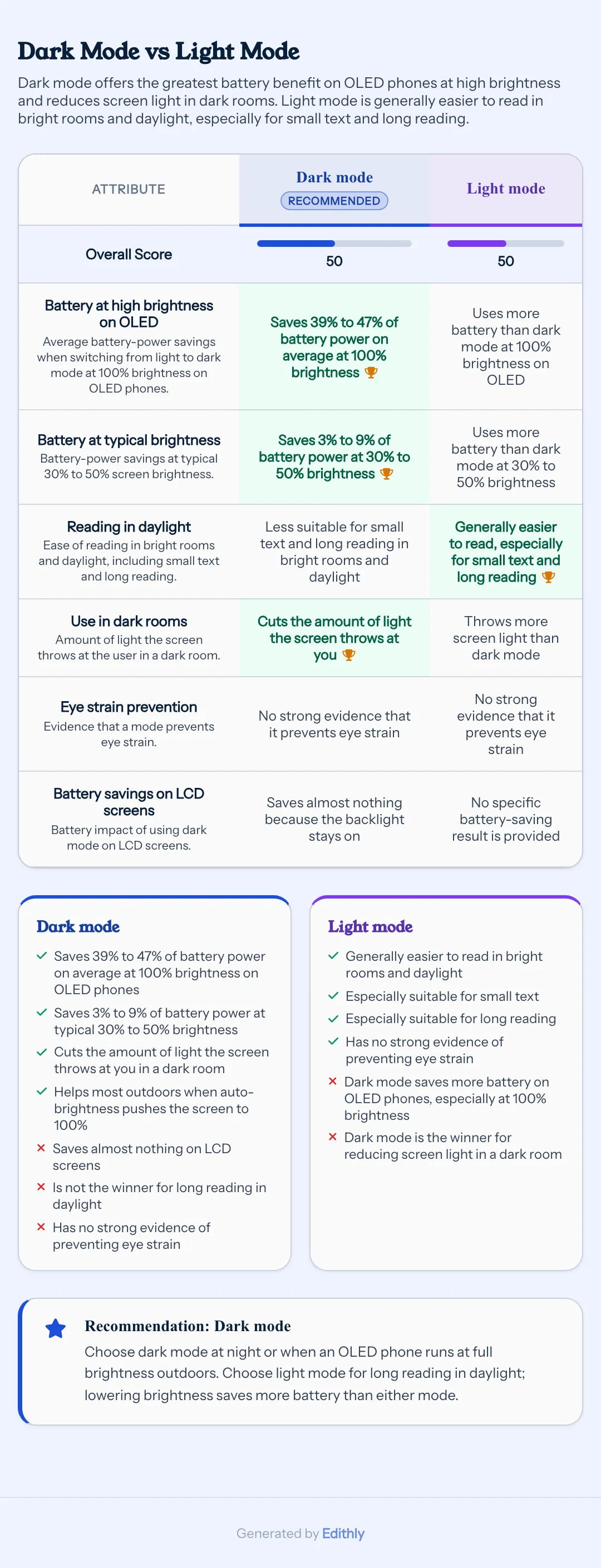
So at the brightness most people use indoors, dark mode is a small win. At full brightness, it's a big one. The visual sheet above puts these two numbers at the top of the comparison.
Why brightness changes everything
On an OLED screen, every pixel makes its own light. A black pixel is simply switched off. Purdue's numbers show the payoff grows with brightness: small at 30 to 50%, large at 100%.
That matters outdoors. Auto-brightness often pushes the screen to 100% in sunlight, which is exactly where dark mode helps most.
On an LCD screen, it's different. The whole panel is lit from behind by a backlight that stays on no matter what color the pixels show. Black pixels just block light that's still being made. So on an LCD, dark mode saves almost nothing.
Putting the numbers in context
Think of it as two different phones in two different places. Indoors, at the 30 to 50% brightness most people leave their phone on, dark mode trims 3 to 9% off the screen's battery use. That's real, but you'd struggle to notice it across a day.
Outside on a sunny afternoon, auto-brightness cranks the same phone to 100%. Now dark mode saves 39 to 47%. Same phone, same apps, very different result. The setting that changed was brightness, not the color scheme.
That's also why the cheapest battery fix isn't a mode at all. Lowering brightness saves more than switching between dark and light.
Reading, dark rooms and eye strain
Battery isn't the only question.
- Reading in daylight: light mode wins. Dark text on a light background is generally easier for long reading, especially small text, in bright rooms and daylight.
- Dark rooms: dark mode wins. It throws less light at you.
- Eye strain: no strong evidence that either mode prevents it. Screen brightness and taking breaks matter more than the color scheme.
Dark vs light, side by side
| Dark mode | Light mode | |
|---|---|---|
| Battery, OLED at 100% | Saves 39 to 47% | Uses more |
| Battery, OLED at 30 to 50% | Saves 3 to 9% | Uses more |
| Battery, LCD | Saves almost nothing | No specific result |
| Long reading in daylight | Less suited | Generally easier |
| Dark room | Less light in your face | More screen light |
| Eye strain | No strong evidence | No strong evidence |
What to pick
- Dark mode at night, or outside at full brightness on an OLED phone.
- Light mode for long reading in daylight.
- Want more battery? Turn the brightness down. It saves more than switching modes does.
The trap to watch for
Switching to dark mode on an LCD laptop or phone and expecting longer battery life. With the backlight always on, you'll barely notice a difference. Check your screen type first, and if you're after battery, the brightness slider is the bigger lever.
Frequently asked questions
Does dark mode save battery on an iPhone or Android phone?
On a phone with an OLED screen, yes, but how much depends on brightness. Purdue measured 3 to 9% savings at 30 to 50% brightness and 39 to 47% at 100%. On an LCD screen it saves almost nothing.
Why does dark mode save battery on OLED but not LCD?
OLED pixels make their own light and switch off to show black. An LCD lights the whole panel from behind with a backlight that stays on, whatever color the pixels show.
Is dark mode better for your eyes?
There's no strong evidence that dark or light mode prevents eye strain. Brightness and taking breaks matter more than the color scheme.
Is dark mode or light mode better for reading?
Light mode. Dark text on a light background is generally easier for long reading, especially small text, in bright rooms and daylight. Dark mode is better in a dark room, where it throws less light at you.