Sales & Business2 min read

How to Get a Sales Infographic From Just a URL

Paste your website URL into Edithly and get a personalized sales infographic per prospect — a glanceable value-prop visual sized for a cold email, not a deck nobody has time to open.

EEdithly Team
How to Get a Sales Infographic From Just a URL

Short answer: Paste your website URL into Edithly, and its GTM engine generates a personalized sales infographic per prospect — a quick-glance visual of your value prop, sized for a cold email or LinkedIn message, not a slide deck nobody has time to open.

When an Infographic Beats a Deck

A pitch deck assumes someone's going to sit down and click through it. Early-stage outbound rarely gets that kind of attention — a cold email attachment needs to make its case in the time it takes to glance at a thumbnail. That's what the Infographic visual type in Edithly's GTM engine is built for: one image, the headline value prop, sized for a first touch, not a scheduled meeting.

How It Works

  1. Share your website URL. Edithly crawls it and drafts your positioning pillars and value props automatically.
  2. Your brand applies itself. Logo, colors, and font are lifted straight from your site.
  3. Import your prospect list. Upload a CSV, or connect Apollo or Clay directly.
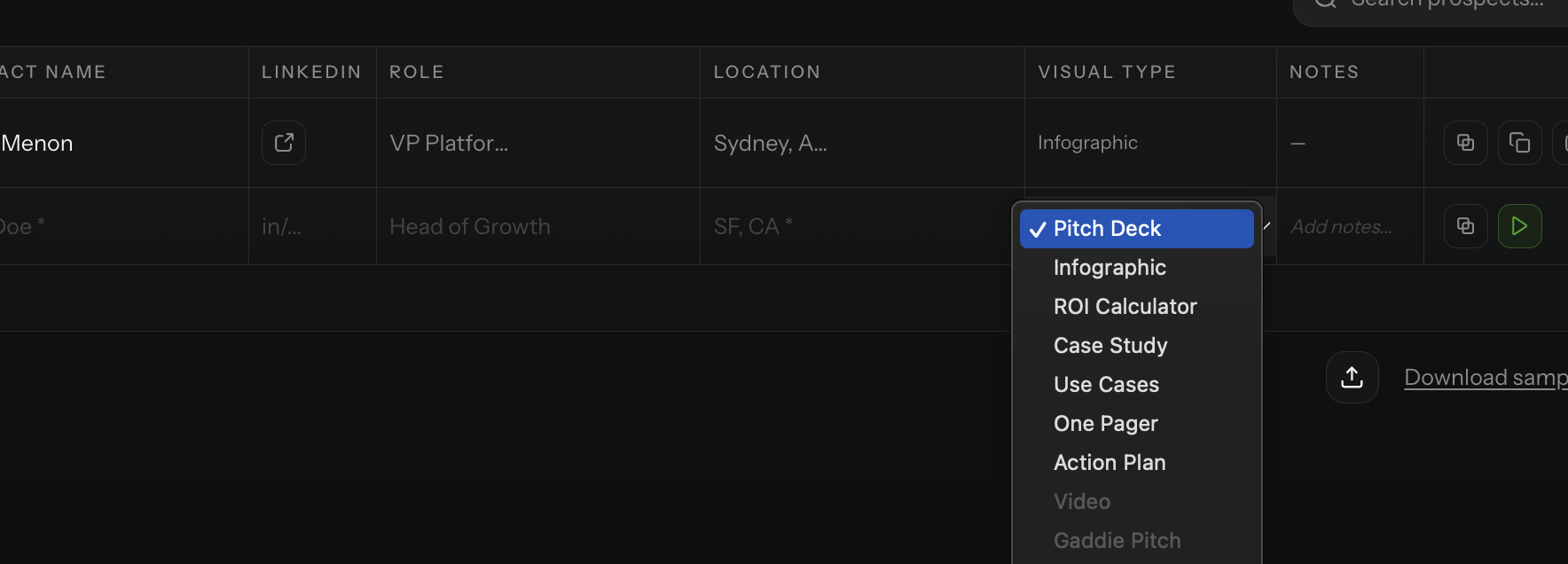
  4. Choose "Infographic" as the visual type and hit play. Get a prospect-specific visual in seconds, ready to attach or share as a link.

What Makes It Different From a Generic Template

Every infographic is generated from the prospect's actual business and mapped against what your product genuinely delivers — the same personalization engine behind Edithly's pitch decks and case studies, just sized for a single glanceable visual instead of a multi-slide narrative.

Where It Fits in Outbound

  • A first-touch cold email attachment
  • A LinkedIn outreach message
  • A quick leave-behind after a discovery call, before a full deck is warranted

Join the Pilot

Join the GTM pilot at edithly.com/gtm — 50 free credits, every visual type including Infographic, no credit card required.

Want the full range of formats, not just infographics? See how to create instant sales documents from the same URL.
Frequently Asked Questions

How is the sales infographic different from a pitch deck?

Same personalization engine, different format — one glanceable image instead of a multi-slide deck. Better suited to a first-touch cold email or LinkedIn message.

Can I use my own brand colors?

Yes, automatically. Edithly pulls your logo, colors, and font straight from your website — no design brief needed.

Does this work for outbound at scale, not just one prospect?

Yes. Import a full prospect list via CSV or connect Apollo or Clay, then run the whole list with one play action.

Is there a limit on how many infographics I can generate?

The free pilot tier includes 50 credits across all visual types. Higher-volume teams can talk to us about the Pro tier.

What other visual types are available besides infographics?

Pitch Deck, ROI Calculator, Case Study, Use Cases, One Pager, Action Plan, Video, and Sales Pitch — all generated from the same URL and prospect list.

Try Edithly free

Turn any document into something useful

Upload a PDF, paste a URL, or drop a YouTube link. Get mind maps, flashcards, MCQs, presentations and more — in seconds.