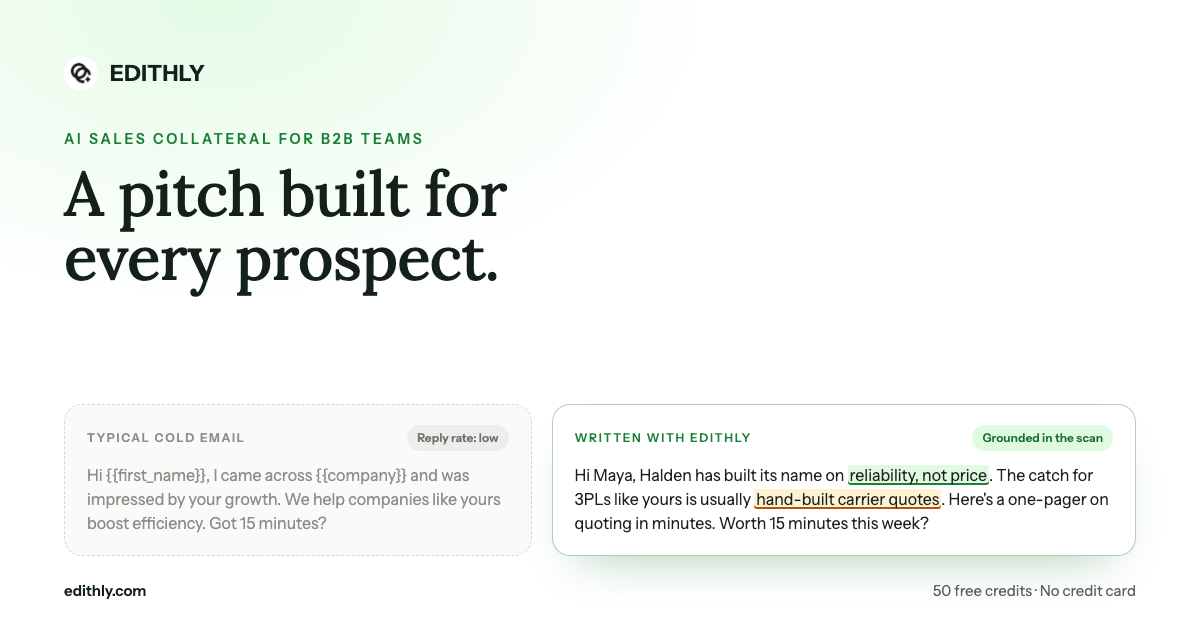
Bottom line: an AI SDR is only as good as its research. Tools that send thousands of lightly personalized emails burn your domain and your market. The ones that work treat every account as a research problem first and a sending problem second.
What Is an AI SDR?
An AI SDR (AI sales development representative) is software that takes on the top-of-funnel job a human SDR does: finding the right accounts, learning enough about each one to say something relevant, deciding whether it is worth pursuing, and opening the conversation. The output it is measured on is the same as a human SDR's: qualified meetings booked for account executives.
The category ranges from fully autonomous "digital workers" that run outbound end to end, to copilots that do the research and drafting while a rep stays in control of what gets sent.
What an AI SDR Actually Does
Strip away the branding and every AI SDR is automating some part of this pipeline:
| Stage | The human SDR's job | What AI changes |
|---|---|---|
| Prospecting | Build a target list against the ICP | Suggests ICP-fit companies and pulls lists from your data tools |
| Research | Read the website, news, hiring, tech stack | Scans every account in seconds instead of 15 minutes each |
| Qualification | Decide if the account is worth a sequence | Rates fit with reasons, so reps skip the bad accounts |
| Outreach | Write the email, LinkedIn note, call opener | Drafts every touch around that account's situation |
| Follow-up | Chase, re-angle, hand off replies | Schedules follow-ups and flags who is engaging |
Where a tool sits on that table tells you more about it than its marketing does.
AI SDR vs. Human SDR
| AI SDR | Human SDR | |
|---|---|---|
| Speed | Researches hundreds of accounts an hour | A few dozen a day, done well |
| Consistency | Same quality on account 1 and account 500 | Drops as the list gets long |
| Judgement | Weak on ambiguous replies and politics | Reads tone, timing and who really decides |
| Cost | A subscription | Salary, ramp time and turnover |
| Risk | Confident mistakes at scale | Slower, but mistakes stay small |
The pattern that works: let software do the research, list building and first drafts, and keep a person on the replies, the objections and the accounts that matter most.
The Trap: Volume Without Research
The fastest way to fail with an AI SDR is to use it to send more of the same email. Buyers spot a mail-merge in one line, and an inbox full of "I came across your company and was impressed by your growth" teaches spam filters and prospects to ignore you.
The fix is not a better template. It is outreach built on something true about the account: a hiring signal, a gap in how they work, the way they position against competitors. That research is exactly what used to make good SDRs slow, and exactly what software is now good at.
AI SDR in Edithly
Edithly approaches the AI SDR job research-first, with a person in the loop. It does the work an SDR spends most of their day on, then hands the rep something worth sending.
- Prospecting. Edithly maps your ICP, TAM, prospects and channels from your own website, and suggests ICP-fit companies with a source link for each. Already have a list? Import it from Apollo, Clay or a CSV.
- Research. Every prospect gets a buying signals scan: recent moves, hiring, funding, tech stack and content activity, each with a source, plus hooks you can use word for word.
- Qualification. A prospect summary rates fit with your offer (strong, possible, weak or not a fit, with a score out of 10), explains why they might buy or might not, and names the likely buyer, blocker and next step.
- Outreach. From the same research, Edithly writes cold email variants with subject lines and follow-ups, a LinkedIn note, a cold call script with objection handling, and a one-pager, pitch deck or account landing page on your brand.
- Follow-up. Every visual asset ships as a share link with a view count, so you can see when an account opens what you sent and follow up while they are paying attention.
You review what Edithly wrote, then send it from your own inbox or sequencer, so your sender reputation stays in your hands. Running a whole list instead of one account? Load it into the workbook and generate for every row at once, or trigger Edithly from Clay, Apollo, HubSpot or Zoho through the REST API.
For a closer look at the research step on its own, see the AI prospect research brief. For the email side, see three angles, not three rewrites.
Top 5 AI SDR Tools in 2026
These are five of the most established AI SDR products right now, chosen to cover the main approaches: fully autonomous, all-in-one, signal-based, inbound and rep-assist. Descriptions reflect each vendor's own positioning at the time of writing.
1. 11x
11x sells "digital workers" for revenue teams: Alice handles outbound prospecting and Julian handles phone conversations. It is built for teams that want agents to execute outbound largely on their own.
Best for: larger teams that want autonomous outbound and calling, with budget for a demo-led sale. Watch for: the less a person reviews, the more your research quality matters, so audit what the agents send in the first weeks.
2. Artisan
Artisan offers Ava, an AI BDR, on an all-in-one outbound platform that bundles prospect data, sequencing and sending, positioned around "AI employees."
Best for: teams that want to consolidate data, writing and sending into one tool. Watch for: moving everything into one platform means your sending setup lives there too, so check how it handles deliverability on your domain.
3. AiSDR
AiSDR focuses on finding in-market buyers through real-time signals, then reaching out with messages written to sound like your best rep.
Best for: teams whose best leads appear when something changes at an account: a hire, a funding round, a new initiative. Watch for: signal quality depends on your market, so test it on accounts you already know well.
4. Qualified (Piper)
Piper is Qualified's AI SDR agent for inbound: it engages website visitors through live chat around the clock and follows up with inbound leads.
Best for: companies with real inbound traffic that leaks pipeline after hours or between form fill and first reply. Watch for: it solves inbound, not outbound, so it pairs with an outbound tool rather than replacing one.
5. Regie.ai
Regie.ai gives sellers AI agents that source, enrich, dial and email from the rep's own inbox, plus LinkedIn tasks, in one workspace with published self-serve pricing.
Best for: reps and small teams who want AI doing the busywork while they stay in the driver's seat. Watch for: rep-assist tools still need reps to run them, so adoption matters as much as features.
Honorable mention: Amplemarket's Duo, an AI sales copilot built around intent signals, AI research and personalization.
At a Glance
| Tool | Approach | Best for |
|---|---|---|
| 11x | Autonomous digital workers (outbound and phone) | Hands-off outbound at scale |
| Artisan | AI BDR on an all-in-one platform | Consolidating data, writing and sending |
| AiSDR | Signal-triggered outbound | Reaching in-market accounts at the right moment |
| Qualified (Piper) | Inbound AI SDR | Converting website visitors and inbound leads |
| Regie.ai | Rep-assist AI agents | Reps who want AI help without giving up control |
| Edithly | Research-first copilot plus collateral | Specific, on-brand outreach for every account, reviewed by a person |
How to Choose an AI SDR
Ask these five questions before you sign anything:
- Where does the research come from, and can you see it? If you cannot check the facts behind a personalized line, you cannot trust it at scale.
- Who presses send? Autonomous sending saves time and concentrates risk. Rep-reviewed sending is slower and safer for your domain.
- Does it qualify, or just contact? A tool that emails everyone on the list is a sequencer with a writing feature.
- What does it give the rep for the call? The meeting is where deals start; a script and a one-pager matter as much as the first email.
- Does it fit your stack? Check how it works with your CRM, your data tools and your sending setup before you check anything else.
Try It on Ten Accounts
Pick ten accounts from this week's list. Run each through Edithly, read the research before the copy, and send the best angle from your own inbox. Then compare reply rates with your last batch.
Start free at edithly.com: 50 free credits, every format, no credit card required.


