Tech explained
Data Breach First Hour Explained: What to Do When Your Data Leaks
Updated Nov 27, 2026 · 3 min read
Confirm the breach on the company's own website or app, not through the email or text that told you, and check haveibeenpwned.com. Then change the leaked password and every reused copy, turn on 2FA with an authenticator app or passkey, review your sessions and connected apps, protect any card or ID details that leaked, and expect targeted phishing for months.
Watch onYouTube
Key points
- ●Never click the link in a "your account was breached" message. Open the company's site or app yourself.
- ●Change the leaked password and every place you reused it.
- ●An authenticator app or a passkey beats SMS codes for 2FA.
- ●Card leaked? Block or replace it in your bank app. ID leaked? Freeze your credit where your country allows it.
- ●Expect convincing phishing for months, and write down what leaked, what you changed and the date.
The moment you get the breach email
A company you use says your data leaked. The instinct is to click the link in the message and fix things right away. That is the first mistake to avoid. A "your account was breached" email or SMS is exactly what a scammer would send, so it can't be the thing you use to check.
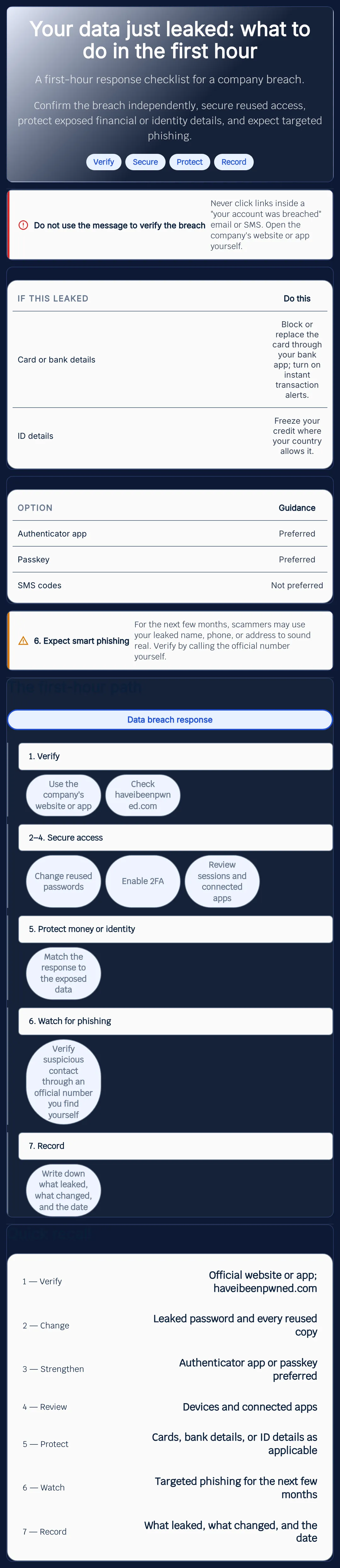
The visual sheet above turns the first hour into seven steps in four groups: verify, secure, protect and record. Here they are in order.
Step 1: verify the breach yourself
Open the company's website or app on your own, by typing the address or using the app you already have, and look for the news there.
Then check haveibeenpwned.com. It tells you which of your email addresses have shown up in known breaches, which helps you see whether this is one leak or several.
Steps 2 to 4: secure your access
Change passwords. Change the leaked password first, then every account where you reused it. The reused copies matter as much as the original: if the same password guards other accounts, the leak puts all of them at risk.
Turn on 2FA. Two-factor authentication means a stolen password alone isn't enough to log in. Not every second factor is equal:
| Option | Guidance |
|---|---|
| Authenticator app | Preferred |
| Passkey | Preferred |
| SMS codes | Not preferred |
Review sessions and connected apps. Look at the devices signed in to the account and the apps connected to it. Sign out anything you don't recognise.
Step 5: protect your money and identity
What you do here depends on what leaked. Match the response to the data:
| If this leaked | Do this |
|---|---|
| Card or bank details | Block or replace the card through your bank app and turn on instant transaction alerts |
| ID details | Freeze your credit where your country allows it |
Transaction alerts are the cheap win, because you see each charge as it happens instead of at the end of the month.
Step 6: expect smart phishing for months
Leaked data doesn't expire. For the next few months, scammers can use your real name, phone number or address to make a message sound legitimate. A call that knows your address feels trustworthy, and that's the point.
The rule is simple: if someone contacts you about the breach, your account or a payment, don't use the number or link they give you. Find the official number yourself and call that.
Step 7: write it down
Keep a short record: what leaked, what you changed, and the date. If something odd shows up on your card or credit report later, you'll know which breach it likely came from and what you already did about it.
The quick-recall version
- Verify on the official website or app, and check haveibeenpwned.com.
- Change the leaked password and every reused copy.
- Strengthen with an authenticator app or passkey.
- Review devices and connected apps.
- Protect cards, bank details or ID details, whichever leaked.
- Watch for targeted phishing over the next few months.
- Record what leaked, what changed, and the date.
If you only have five minutes, do steps 1 and 2 first: confirm the breach without touching the message, then change the reused passwords. Everything else can follow within the hour.
None of these steps takes long on its own. Done in order, they close the doors a leak opens before anyone has time to walk through them.
Frequently asked questions
Should I click the link in a data breach email?
No. Scammers send fake breach notices because people panic and click. Open the company's website or app yourself to confirm the breach, and check haveibeenpwned.com to see which of your accounts showed up in known leaks.
Which passwords should I change after a data breach?
The password for the breached account, plus every other account where you used the same password. Reused passwords are what turn one company's leak into a break-in on your email or bank.
Is SMS two-factor authentication good enough?
It is better than nothing, but an authenticator app or a passkey is the preferred choice. SMS codes are listed as not preferred on the checklist.
What should I do if my card details were leaked?
Block or replace the card through your bank app and turn on instant transaction alerts, so you see any charge the moment it happens.